Face clear and sharp
Upload a clear face-on photo of an adult or a pet — the template stylizes that face as the cartoon toddler. Do not upload a real child’s photo. Soft, tiny, or cropped-out subjects make identity drift.
Viral template
A short cartoon-toddler car gag: your photo keeps that motion. Genjutsu AI holds the timing. Stills change the look.
About 14 seconds
On this page
The panel below is the homepage studio, already on this template. The sample is the cartoon-toddler car gag motion reference.
Reference video
AI Baby Gangster
14s · 1,140 credits · Seedance 2.5
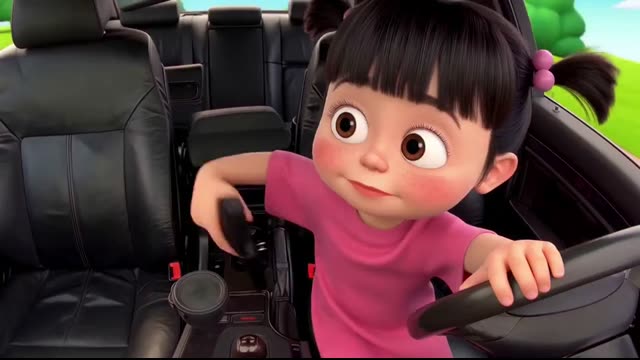
AI Baby Gangster is a Genjutsu AI photo-to-video template on genjutsuai.app. The reference clip is a 3D cartoon toddler sitting in the driver’s seat, taking a prop pistol from the console, firing one shot with a tough little frown, then freezing wide-eyed in shock. Your still changes who is on screen; the sample keeps the staging.
Adults who want their own face (or a pet they have permission for) stylized as this cartoon-toddler car gag. Do not upload a real child’s photo.
The sample holds a 3D cartoon toddler sitting in the driver’s seat, taking a prop pistol from the console, firing one shot with a tough little frown, then freezing wide-eyed in shock. A photo changes who is on screen; it should not rewrite the staging.
Background
AI Baby Gangster is a short cartoon gag: a 3D toddler sits in the driver’s seat of a car, pulls a prop pistol from the console, fires one shot with a tough frown, then freezes wide-eyed in shock. The original caption was “a bit too young for this.” The joke is the mismatch, not a real child.
Instagram creator @y3ssai posted the car scene on 3 November 2026 (a cartoon toddler in a pink shirt), then the same staging with other cartoon characters the same night. On TikTok the wider toddler-gangster joke has lived under #babygangster (about 92.99 million views), #gangstababy (about 67.78 million) and #babygangsta (about 64.25 million).
This page is an independent Genjutsu AI photo-to-video remake of that cartoon car gag. Upload an adult or pet photo to stylize — never a real child’s photo. Genjutsu AI is not affiliated with MakeViral, CapCut, or Higgsfield.
How it works
01
This page opens with the AI Baby Gangster clip already chosen. That file is the motion, the staging, and the timing.
02
A photo is optional. With no photo, the template still generates from the sample. Upload a clear face-on photo of an adult or a pet so the cartoon remap can read the face. Do not upload a real child’s photo.
03
Press Generate. The button shows credits for this length and quality first. Keep source audio on by default unless you want a silent export.
Photo tips
The set, the timing, and the camera are already in the sample. The still only has to show the subject clearly.
Upload a clear face-on photo of an adult or a pet — the template stylizes that face as the cartoon toddler. Do not upload a real child’s photo. Soft, tiny, or cropped-out subjects make identity drift.
Ordinary daylight or clean indoor light is enough. Soft focus, heavy beauty filters, and extreme HDR make identity drift.
The sample already has the cartoon-toddler car gag staging. A photo with extra people or clutter makes the remap harder.
Use a photo of yourself, or of a friend who already agreed (or a child/pet you have permission for). Some templates ask you to skip children’s photos — follow that note when it appears.
Credits
The Generate button shows the credit price before you start. It follows the reference length and the quality you pick. A longer sample costs more, and 1080p costs more than 720p or 480p.
Sample length is the default. If a duration is missing, the studio measures the file, then shows credits. Your own reference video is priced from that file. Clips that are too long are rejected before a job starts.
Leave mute off for a soundtrack from the model, or check mute and add music later. Mute does not change the camera or the timing. A failed job returns the credits.
Use cases
The motion and the timing stay. The look changes.
Upload a clear adult or pet photo and leave the sample. You get a short cartoon clip of that face in the driver’s-seat gag. Do not upload a child’s photo.
One clip per subject who already said yes (or whose owner/guardian said yes). Separate photos keep each identity clean.
Run two photos through the same sample when you want to see which still holds the beat. Staging and timing stay fixed.
Generate with no photo to watch the motion, or to check credits and length. Add a photo on the next run.
Examples
The player at the top is the AI Baby Gangster motion reference: a 3D cartoon toddler in the driver’s seat, one prop-pistol beat, then a shocked freeze. That timing is what Genjutsu AI keeps when a photo changes the look.
Other published templates use the same photo-to-video studio. Each one keeps its own sample motion, and you can open it to generate on that template’s page.
A Genjutsu AI photo-to-video template of a 3D cartoon toddler sitting in the driver’s seat, taking a prop pistol from the console, firing one shot with a tough little frown, then freezing wide-eyed in shock. Upload a photo to change who is on screen; keep the sample for motion and timing.
No. The clip generates from the template alone. Upload a photo when you want the look to change — with permission.
The aim is to keep the sample’s a 3D cartoon toddler sitting in the driver’s seat, taking a prop pistol from the console, firing one shot with a tough little frown, then freezing wide-eyed in shock. Extreme crops or busy group shots make remapping harder.
Look at the Generate button. The shipped sample is about ~14s. The price follows that length and the quality you pick.
Yes. Source audio stays on uploads by default for this template. Mute in the studio if you want a silent export.
A clear face-on photo of an adult or a pet. Do not upload a real child’s photo. Skip group shots, masks, and tiny distant faces.