Face and front paws clear
Upload a pet portrait where the face is large and sharp, with enough of the front body for a paw thrust. Soft distant shots and chin-only crops fight the close gag.
Virale Vorlage
A short vertical pet gag: your cat or dog sits facing camera, then thrusts both front paws forward with middle claws out like flipping you off. Genjutsu AI keeps that motion. One still changes the pet.
Etwa 3 Sekunden
Auf dieser Seite
The panel below is the homepage studio, already on this template. The sample is the pet paw-thrust motion reference. There is one photo slot for the pet. Mute if you will attach a track you have rights to when you post.
Referenzvideo
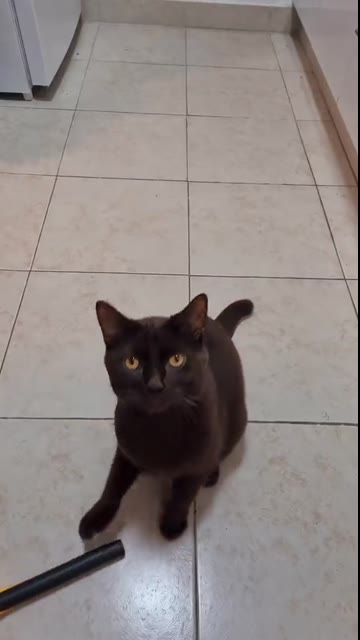
Cat Middle Finger AI
3s · 310 Credits · Seedance 2.5
Cat Middle Finger AI is a Genjutsu AI photo-to-video template on genjutsuai.app. The reference clip is a short vertical pet gag, about 3 seconds: a pet sits facing the camera, then thrusts both front paws forward with middle claws out like a double flip-off. One photo changes the pet in every shot. Paw-thrust timing, camera, and room stay in the sample.
Anyone who wants that middle-finger pet meme with their own cat or dog, or a clear pet still a friend already agreed to use. There is one photo slot for the pet. Tiny distant animals and group shots fight the close paw thrust.
The sample holds the sit, the double paw thrust, the middle-claw pose, and the short cut length. A photo changes the pet’s face, fur, markings, and body. It does not rebuild the room or the thrust timing.
Hintergrund
The “my cat is so friendly” / middle-finger cat meme is an October 2026 AI pet gag wave: a cat looks cute, then stands or sits up and flips one or two middle fingers at the camera. Creators call it the middle finger cat, the cat flipping off meme, or “my cat is so friendly.”
TikTok @merkurianin posted a widely remixed take — a black cat drops a fly swatter, sits up, and shows two middle fingers — listed around 585k plays on MakeViral’s heat list for the 30 October 2026 Asia/Shanghai ship. Remakes such as @andrewdurant2’s orange-cat road walk kept the double flip-off beat. MakeViral lists the module as cat-middle-finger-ai-trend. Social TikTok downloads for this Genjutsu AI ship failed after retries (403 / blocked), so the motion sample follows MakeViral’s clean original under standing rule 1c; the public trend leads above still name the origin wave.
This page is an independent photo-to-video remake of that middle-finger pet gag. Genjutsu AI is not affiliated with @merkurianin, @andrewdurant2, MakeViral, CapCut, or Higgsfield. The sample keeps the motion and the timing. The soundtrack may be muted or overlaid because trend music is not licensed here — add a track you have rights to, and say the result is AI when you post it.
So funktioniert es
01
This page opens with the Cat Middle Finger AI clip already chosen. That file is the sit, the thrust, and the length. Watch it above, then leave it in the panel. Credits appear once the length is known.
02
A photo is optional. With no photo, the template still generates from the sample. Upload one clear photo of your cat or dog — face and front paws readable — or of a pet whose owner already agreed. Skip heavy filters, sunglasses props, and extra animals in the frame.
03
Press Generate. The button shows credits for this length and quality first. This run uses system audio overlay because the viral trend music is not owned by Genjutsu AI. Mute if you will replace the sound when you post, and label the upload as AI. A failed job returns the credits.
Fototipps
The room, the sit, and the thrust timing are already in the sample. The still only has to show one clear pet.
Upload a pet portrait where the face is large and sharp, with enough of the front body for a paw thrust. Soft distant shots and chin-only crops fight the close gag.
Ordinary daylight is enough. Soft focus, heavy beauty filters, and extreme HDR fight the identity match across the sit and the thrust.
The sample already has the camera and the room. A photo with a second pet or a busy crowd makes the model guess who flips you off. Crop to the one animal you want.
Use a photo of your own pet, or of a pet whose owner already agreed. Skip celebrity animals, kids’ photos, and grabs from someone else’s story without asking.
Credits
Auf Generieren steht der Credit-Preis, bevor du startest. Er folgt der Länge des Referenzclips und der gewählten Qualität. Länger kostet mehr, 1080p mehr als 720p oder 480p.
Standard ist die Länge des Beispiels. Fehlt sie, misst das Studio die Datei und zeigt danach die Credits. Dein eigenes Video wird nach dieser Datei berechnet. Zu lange Clips werden abgelehnt, bevor ein Job startet.
Stumm aus, wenn der Ton vom Modell kommen soll. Stumm an, wenn du später selbst Musik legst. Kamera und Timing bleiben davon unberührt. Ein fehlgeschlagener Job gibt die Credits zurück.
Einsatz
The motion and the timing stay. The pet changes.
Upload a clear pet photo and leave the sample. You get a short vertical clip with the paw-thrust motion and your animal’s face.
One clip per pet whose owner already said yes. Separate photos keep each face readable on the thrust.
Run two photos through the same sample when you want to see which still holds the sit and the thrust. Timing does not change between runs.
Generate with no photo to watch the paw-thrust motion, or to check credits and length. Add a photo on the next run if you want the look to change.
Beispiele
The player at the top is the Cat Middle Finger AI motion reference: a vertical pet sit and double paw thrust, with the gag timing left in the sample. Photo-to-video keeps that motion. An optional photo changes the pet. The same sample is loaded in the generator, so you can upload and render on this page. Mute or replace the soundtrack when you post.
Die anderen veröffentlichten Vorlagen nutzen dasselbe Foto-zu-Video-Studio. Jede hat ihren eigenen Beispielclip, und generiert wird auf ihrer Seite.
A Genjutsu AI photo-to-video template of the middle-finger pet gag. The sample locks the motion and the timing. One photo can change the pet in every shot.
No. The gag clip generates from the template alone. Upload one photo of your pet, or of a pet whose owner already agreed, when you want the look to change.
The aim is to keep the sample’s sit, double paw thrust, middle-claw pose, and short cut length. A photo changes the pet. It does not rebuild the room or the thrust timing.
Look at the Generate button. The shipped sample is about 3 seconds. The price follows that length and the quality you pick. A failed job returns the credits.
Yes. This template uses system audio overlay because the viral trend music is not owned by Genjutsu AI. Mute when you want a silent file and you will add a track you have rights to. The paw-thrust motion and timing stay either way.
One pet, face clear, front body visible, sharp and in good light: your animal, or a pet with permission. Skip group shots, heavy filters, and tiny distant animals.